Showing posts with label Window Trick. Show all posts

Monday, March 5, 2012

Windows 8 Consumer Preview Launched

Now Windows 8 Consumer preview has been launched by Microsoft. If you want to download the windows 8 then you can download it from Microsoft’s official website. It is available in both 32-bit and 64-bit OS. Microsoft has launched the Beta version or Consumer Preview for people that have almost all the features of the final product. Remember even this version may have few bugs.
Installation process of Windows 8 is just same as that of Windows 7.
System Requirements for Windows 8 Consumer Preview
  • Processor: 1 gigahertz (GHz) or faster
  • RAM: 1 gigabyte (GB) (32-bit) or 2 GB (64-bit)
  • Hard disk space: 16 GB (32-bit) or 20 GB (64-bit)
  • Graphics card: Microsoft DirectX 9 graphics device or higher
  • To use touch, you need a tablet or monitor that supports multitouch
  • To access Windows Store and to download and run apps, you need an active Internet connection and a screen resolution of at least 1024 x 768
  • To snap apps, you need a screen resolution of at least 1366 x 768
New Features Added in Windows 8 Consumer Preview
Microsoft has added a variety of new features in Windows 8.
  • Instead of Start Menu orb there is a charm bar on the Desktop screen.
  • Along with text secret password there is also a picture password.
  • New Metro UI graphical interface has been added in it.
  • New applications have been added to enhance Social Networking and Email experience.
  • One of the main aspects of windows 8 is its performance and speed. Windows 8 has been tested in rigorous conditions like sudden power off.
  • Alarm Feature has been added in it.
Download Windows 8 Consumer preview
To Download Windows 8 Click Here
Windows 8 is completely new operating system developed by Microsoft and the final version of Windows 8 is expected to be launch in second quarter of this year.

Post Written By:: Government Jobs | Sarkari Naukari | Latest Govt Jobs

Friday, October 14, 2011

21 Computer Tips For Increasing XP Performance


Today in this post of windows tricks I am going to gives you 21 tricks to increases your windows xp performance.

1). For the higher performance on windows xp your PC must have the following configuration 256MB RAM, 512 MB Cache , Intel Pentium 4 Processor, 40 GB HDD. These are the minimum requirements for the windows xp.

2). If you see a 'virtual memory low' message then increase its virtual memory. To increase virtual memory follow the following step of this pc trick.

**Go to My Computer->Properties->Advanced->Performance Settings->Advanced->Virtual Memory->Change->Select the appropriate drive->Custom size->set appropriate level(our it is 600(min.) & 700(max.)->Ok.

3). Increase 'Visual Performance'.To do so follow the following step of this pc trick step:

**Go to My Computer->Properties->Advanced->Performance Settings->Visual Settings->Custom->Select only the following options.
a). Slide taskbar buttons.
b). Smooth edges of screen fonts.
c). Smooth-scroll list boxes.
d). Use a background image for each folder type.
e). Use visual style on windows and buttons.

4). Don't keep unwanted/extra fonts. To remove extra fonts from your computer do the following step:

**Go to Start->Settings->Control Panel->Fonts.

5). Your Desktop Wallpaper & Screensaver consume a large amount of disk space. Select the 'None' option for both wallpapers & Screensavers.

6). Avoid keeping DEMO Games.

7). Uninstall the unwanted Software’s from your computer.

8). Use Registry Cleaner to keep your registry clean(without errors).

9). Try to keep Music and pictures files in the folder specified by windows itself.

10).Use Hybernating Option for Quick windows start. To active Hybernating follow the following steps of this windows tricks.

**Desktop->Properties->Screensaver->Power->Hybernating->Enable Hybernating->Ok.

11). Keep your Desktops clean remove an unwanted icons.

12).Use Intel Application Accelerator to speed up your disk access.

13). Memory management (at least 512MB RAM Required). This allows XP to keep data in Memory instead of paging section of RAM. Do the following steps of this windows xp tricks:

**Go to->Start->Run->regedit->HKEY_LOCAL_MACHINE->SYSTEM->CurrentControlSet->Control->Session Manager->Memory Management->Double click it->DisablePageingExecutive->Double Clik it->Set value to 1.

14). Disable Yahoo Messenger, Google Talk, and other unwanted programs from startup. (You can use registry editior to do this.). Because they do not appear in normal Startup Option.

15). Disable indexing files service (only if you do not use search option regularly). To do this follow the following steps of this windows tricks.

**Go to My Computer->Select the drive for which you want to disable the indexing service->Properties->Unselect 'Allow Indexing Service'->Ok.

16). For Windows XP, You must use NTFS partition. FAT partition is less supportive for Windows XP.

17). In BIOS, Select first booting device as your HDD.

18). Setting Priority High for a particular program. Do the following steps to perform this windows tips:

**Open Task Manager->Processes->Select the desired Program->Right Click->Set Priority->High->Ok.
This Priority set if for current session. Once you restart your system then its priority will again be Normal.

19) Keep deleting your Temporary Internet Files in regular intervals.

**Go to Windows Drive (c: or d:)->Select the User->Local Settings->Temporary Internet Files

20). Empty your browser's cache in regular intervals.

21). Avoid keeping Movies in your PC.
   
Apply all these PC Tricks on your computer and saw the difference with your own eyes.

Tuesday, July 26, 2011

Windows Trick On How To Enable RUN Button In Windows 7

All windows 7 user know that there is no RUN button on the START menu. But we can add RUN button on the Start menu by using this pc trick. Well, in older Windows version like XP and Windows 2000 the run command line appears on the Start menu but it is not present by default in versions of Vista and Windows 7. If you are used to the Run command, there is a way to get it back in Windows 7 by this windows tricks.
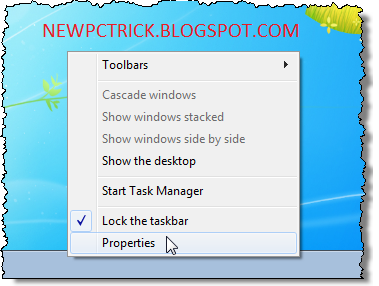
1).The first step that you have to perform for this pc trick is right-click on the Windows 7 Taskbar and select Properties.
2).The Taskbar and Start Menu Properties dialog box displays. Click the Start Menu tab and click the Customize button.As shown in the screen shot of this pc trick below:

3).The Customize Start Menu dialog box displays. Scroll down to the Run command option and select the check box. The options are listed in alphabetical order. Click OK.

4).Now you have to click on Apply on the Taskbar and Start Menu Properties dialog box and then click OK.

5).After completion of these four step of pc trick the Run command is now available on the Start menu of windows 7.

Thats all about this pc trick. To perform this windows tricks you have to just follow the above four steps of this pc trick.Now you can use the Run dialog box to run Control Panel tools and Windows utilities and applications. Here are some useful commands:

Wednesday, July 20, 2011

Burn CD/DVD Without Software PC Trick

Many of us do not know about this PC trick. Do you know that windows XP comes with a built-in CD-copy feature that not many people are aware of this windows tricks.Some time you want to make the copy of our favorite software for that purpose you have to download a software to burn your CD/DVD.But after reading this PC trick you are able to burn the CD/DVD without any software. With this feature in-built feature in windows XP, you can write some data or MP3 files to a CD/DVD, or erase a re-writable CD/DVD.
If you're using a Re-Writable CD (CD-RW), make sure the disc is blank. You might need to erase (or "format") it before use. For information how to erase a CD-RW on Windows XP without using any other software, follow these steps of windows tricks..
Requirements: For this PC trick you need to enable the CD-R feature on Windows XP. If you haven't done so, then read this windows tricks.

1).First step of this windows tricks is to insert a Formatted-Rewritable CD or a Recordable (CD-R) disc into the CD drive.

2).Now for this PC Trick you have to double-click on "My Computer".

3).Navigate to the files/folders you want to copy to CD. Select them and press "Ctrl-c" to copy.

4).Browse back to the CD-ROM, and press "Ctrl-V" to paste. The files/folders will show up as temporary files/folders at this time.


5).On the left panel, select "Write these files to CD".


6).The window "CD Writing Wizard" appears with the default CD name. Change the CD name if you wish, then click "Next".

7).The "CD Writing Wizard" starts to write files/folders to the CD
8).Once the writing process is complete, the wizard will disappear and the CD-Rom will be ejected after the completion of this PC Trick.

Thats alll about this windows tricks. This PC Trick ables you to burn your CD/DVD without software.Thanks for reading my collection of tricks. For more PC tricks continue visit on our web site.

Monday, June 20, 2011

Windows Tricks On How To Backup Ur Windows Xp


After a very long time today i am going to give you the windows tricks.This windows tricks is about how to backup your window XP.This pc trick is very easy to perform.You must apply this windows tricks on your computer, so that if sometime your window get affected with some virus and you need to format it, then your data remain save through the backup of the windows.This PC Tricks is very easy to perform.You have to followed the following steps to perform this windows tricks.
1. For this windows tricks Click on Start -> Run -> then you have to type in, with out the quotes, "ntbackup.exe" .
2. Click on Backup Wizard and then "Next".
3. Select the radio button "Backup files and setting" and click "Next".


4. Choose a location where you will save your backup.


5. Type in a name of your backup that you will recognize and click "Next".
6. Click "Finish" and your backup will begin.
7. It will complete and provide you a report of the backup.
8. Click "Close" and your backup is complete.

This windows tricks is essential one to all computer users so for more security of your data apply this pc tricks.

Note:
* Make sure the location you are backing up to has enough storage space to backup your entire computer during this pc tricks.
* You will have to be certain you won't have to turn off your computer during the windows tricks for backup.
* Full System backups can take extended amounts of time depending on how much data you have to backup so be prepared...

Saturday, April 23, 2011

Resume Your Work After Shut Down


Do you know a very good hidden feature of Windows XP. Now I am going to give you new window trick that helps you a lot.
Main advantage of the trick is:
You can leave your work in between and shutdown the PC and when you start your pc it will resume your work.
When you want to stop your work and shutdown (Keeping your programs open)
For applying this PC trick on your PC do the Following steps :

1. Click start button on the desktop.

2.Choose Turn Off option.

3. As the Turn Off menu comes up press ‘Shift’ and ‘Stand By’ changes to ‘Hibernate’

4. Click Hibernate (Shift Kept Pressed)

Your xp will save the work and shutdown !
Now, when you switch it on again it will resume it again !
No loading of windows will take place and you will be resumed to your work as if you had just switched your monitor off and now on again !
It seems to be a Amazing window trick! Apply this new pc trick and save your time .

Saturday, April 9, 2011

New Tricks To Change Windows 7 Logon Screen Background

Windows 7 has been a great product from Microsoft.Its features like problem step recoder( psr),sticky notes,new calculator,improved notepad and wordpad are wonderful.What I did not liked is its logon screen.So I decided to change the background of the logon screen to my custom wallpaper by using these pc tricks.I found three window tricks to change the logon screen and i will explain all of the three methods in this post.


The first PC trick is given below :
1.Using Logonstudio:-
Logonstudio is a free application provided by stardock.This application is compatible with Microsoft windows 7,vista and xp.It comes preloaded with many beautiful logon screens and you can literally thousands of them from wincustomize.com .Logonstudio is fairly simple to use all you have to do is the select the background theme and apply it.For using this PC trick your system must have the following requirements as given below:

The system requirements for windows logonstudio are
Windows 7, Vista or XP
●Minimum screen resolution: 1024 width and 768 height
●10MB free drive space
●512MB RAM

2. Windows 7 Logon Screen Rotator:-
This utility is of great use for all those who likes change.You can specify 10 images that will be changed every time you logon to your windows.So,you wont have to get bored by seeing the same logon screen over and again.The best part of this utility is that not installation is required for it.To use this PC trick you have to do the following things.
1Open the zip file.Click on the exe file.
2.Now specify the custom wallpapers you want to use as logon screen.


3.Click on “Enable and Exit”.And that’s it.You will see a new logon screen when you login next time.

4.Now if any time you feel the that you want to revert back to original windows 7 logon screen then click on”revert to windows 7 default logon screen”.
Note:this application requires that your custom wallpapers should be less then 256 kb in size.

3. Windows 7 Logon Screen Changer:-
This is another utility that will allow you to change the logon screen.It is fairly simple to use.It also provides an option to revert back to the original windows 7 logon screen.


These all three window tricks are easy to implement and make your logon screen more ateractive,so apply these PC trick on your system and feel the differance.

Thursday, March 24, 2011

How To Display Shut Down Menu In Window When Power Button Press

By default, your Windows XP will shut down when the Power button is pressed off. I have a new window trick to change it so that the shutdown menu is opened instead it get turn off automatically.
This window trick is so easy to perform. The steps of this new trick given below:
1).First of all, Go to your Windows XP’s desktop and with the help of mouse do the right-click.
2).Select “Properties” option.
3).The Display Properties window will appear.
4).Open the “Screen Saver” tab and look for the “Power” button near the bottom of the window.
5). Click on the POWER button as shown below in screen shot:


6).After this the “Power Options Properties” window will open.
7).Choose the “Advanced” tab.
8).The dialog box is open in the “Power Buttons” section, and you have Choose what you want Windows to do when the power button is pressed.
9).Choose the “Ask me what to do” option.

10).Click “OK” and restart your computer. From now on, pressing the power button off your PC will open the shutdown menu, letting you decide what you want to do.
That’s all about this new window trick. Apply this window trick on your PC and make it more safe.