Showing posts with label Web Trick. Show all posts

Thursday, February 2, 2012

Web Trick To Recover Your File From MegaUpload

We all made our account on various file sharing website such as Mega-upload, Mediafire,4shared and many others. We all made our account on these websites to upload our files on them and make a backup for our  files online. Mega-upload was one of the most popular file sharing website which is currently shut down by FBI because this organization appeared to violating copyright laws. 
The massage which comes on Mega-upload website when you open it in your browser is shown below in screen shot:


When we are uploading our files on the file sharing website due to the popularity on the website it also get shared on multiple file sharing website. Now the Mega upload is  not working and you want to recover your file then you can do it by follow the following steps of this web trick:

 Web Trick to Recover The File From Megaupload::

 1. To recover your files you must know the exact file name and file size or the url link of your file.

1.       2. If you know the Direct url link of your file then you can simply search it on Google.
2.       3. Now at the top result in the Google you will saw the file descripation,file name and file size. As shown below in screen shot::


1.       3. Copey the file Name and search it again in the Google.

2.       4. Now I found the file on Rapid Library server for which I am looking.As shown below:

That’s it now you have recovered your file after downloading it.So simple to perform this one web trick.

Tuesday, November 15, 2011

Web Trick To increases your Torrent Speed to Double.

If you are just tired off for waiting for long time to complete your download then apply this web trick and speed up your download. The U-Torrent and Bit-Torrent are the famous one torrent used by users for downloading but due to slow speed they take long time to complete the download.
One of the best trick to download torrent files fast is that to convert torrent file into direct link and download them using Internet Download Manager (IDM) as it gives much higher speed of download as compared to Torrent. And in this post of web trick i am going to gives you the trick on how to convert the Torrent file into IDM file for fast download.

There is a free web service on internet known as Torrific.com that instantly generate direct link  of .torrent file into a direct link.
Here's how to download torrent files via IDM through Torrific-generated direct link:
  1. The first step of this web trick is to creat free account on Torrific.com.
  2. Go to  any  site that provides torrent link and search for torrent you wish to download.
  3. Obtain torrent URL. To do this, right click "download this torrent" and select "copy link location".
  4. After you've copied torrent link, go back to Torrific.com and paste torrent URL to the textbox and hit GET button. (Then Torrific.com will sends you a direct link on your mail).
  5. Depending on the number of your torrent seeds, you should be able to see direct link for your file.
  6. If direct link for your torrent is now available, copy its URL, launch your IDM and start downloading!
Give a try to this web trick and feel the difference between your downloading speeds.

Saturday, August 27, 2011

Crack(Bypass) PayPal Payment Step And Get Free Stuff Online

With the help of this web trick you are able to bypass or crack paypal payment step. For this web trick you have to use a small piece of Java Script to crack paypal. When you just insert this Java script in the address bar when you reach to the payment step,it directly take you to the download link. So this web trick is only apply on the web site which provide paid download. So hurry use this java script and get free download online by cracking paypal payment step.


Before doing this web trick ,lets understand how the paypal money transfer process takes palce:

PayPal is a service that allows you to pay your payments through internet as well as money transfers facility through the Internet.  When we pay a web site through paypal by clicking on "PAY NOW" button,  as the payment get transfer to the account of the Owner they will redirect you to the secrete download page. Remember this download page is secret, but anyone who knows the URL of this page can access it. By using this javascript we can escape the payment step and get the secret page of download
Now this pc trick works only for the of download pages, i.e. for websites using Paypal’s “Pay Now” button for download only.below is the piece of code:

javascript:top.location=document.getElementsByName('return')[0].value;

Use this Above Java script to perform this pc trick and enjoy  paid stuff absolutely free without paying zero money.Please place your comment about this pc trick. You have to place this Java Script in the Address bar when you reach to the Pay NOW step and just to click Enter to crack payapal.

Wednesday, August 24, 2011

PC Trick To Crack Copy Protection of any web page( Enable Right Click Option)


There are several of web sites that turn off the ability of right-click on their pages.  Web administrators are using this to protecting their web pages from unauthorized copying. This one pc trick is very common in past, but still there are lots of sites using this pc trick  to protect copying there content by others.

 For this PC Trick we have to use simple JavaScript to enable the ability of right-clicking on any web pages to copy the data. Here I’m going to show you a very simple way to turn this function ON by this pc tricks.
Whenever you visiting offending website type the code in red below in the browser URL bar, with the most cases this pc trick will work perfectly and enable you to right click on any web page and do what ever you want by applying this pc trick.


“javascript:void(document.oncontextmenu=null)”


Just paste the above code into the address bar and you are able to copy the data from the protected site.
This PC trick is just a simple java script trick. Copy the code given in red line and paste it in the address bar thats all about this pc trick.

Wednesday, August 10, 2011

Web Trick To Tracing In YAHOO While Chatting

Today I am going to give you a new PC Trick with the help of which you are able to track the person with which you chatting is from which place and country. This Web trick is very useful when there are many unknown friends in your mail list and you come to know that one of them is fake or giving wrong contact information then with this PC Trick you are able to track that person so easily. This web trick is so easy to perform and you can apply this one pc trick with in 5 minute. So follow the following steps for this PC tricks.

1).For this web trick you have to open the link given below:
http://shivampatel.net/trace

2).The next step that you have to perform for this PC trick is type your email id on the text box given in it.

3).Open your yahoo id u will get a mail regarding this web trick that you applied to track the person……

4).While chatting in yahoo send this link  “http://acmepeers.com/?u=omo “  to the target and allow them to click it.

5).When the target person click on the link the PERSON TRACKED by this pc trick…u will get mail regarding country ,city,latitude longtidue, IP ADDRESS,about his system. That’s all about this web trick. Click To get  MOBILE TRICKS  And GPRS TRICKS.

Wednesday, August 3, 2011

Web Trick To Gives Every Time New Mail ID To Your Friends

This one PC Trick is very interesting to perform on your Friends as well as on your  girlfriend to show that how much you loves them. Want to learn how? Then learn this PC Trick and I am sure that you are able to perform this web trick with ease.
So, the web trick goes like this, say you have a email id sandy@gmail.com
If your Friends wants to send you a mail then they will send it at this email address and with this PC Trick you make this more interesting and funny.

Now, Let takes an example to understand this pc trick, assume that  you have three friends ,there may be many, just talk about three in this example .
Johan.
Marry.
Smith.

If you want to give your friends a unique email id then you can gives the following to them.

For Johan It could be "sandy+johan@gmail.com"

For Marry It could be "Sandy+Marry@gmail.com"

For Smith It could be "sandy+Smith@gmail.com"

So, its simple you could add anything after the initial mail by adding a "+" sign.

As all these Email Addresses sandy+Johan@gmail.com, sandy+marry@gmail.com, & sandy+Smith@gmail.com are the same as sandy@gmail.com

If you have a girlfriend then impress her that how much you love her by showing her name with your mail id.
So I hope all my readers will like this one PC Tricks. Apply this web trick on your mail account and show your friends that how much you love them. ENJOY…
Note: This web trick  only works when you are sending mails, Not for logging into your account.


Thursday, July 28, 2011

PC Trick On How To Block A Website

Today i am going to gives you new one pc tricks with the help of which you can easily block any site.This PC trick is very helpfull to the  parents as well as for the institutes so that  they can block access to certain websites on their computer or computer network so that the children and the student can’t get to them from internet.

Have you even been in a situation when you have to block certain websites from your computer for any reason? If yes then go through this pc trick or web trick .Well, I am not sure about any body else but certainly I have been many times in such situation and i block such website with the help of this pc trick.

You can just block the websites you don’t want them to visit. In just 3 simple steps of this web trick.You can block as many as website with this pc trick.There is no need to download any software for this pc trick, you have to just follow the following steps of this pc trick.

Step 1.


First of all Click on START à RUN. Then you have to Type the following code.
C:/Windows/System32/drivers/etc/hosts     and click on OK
Step 2.
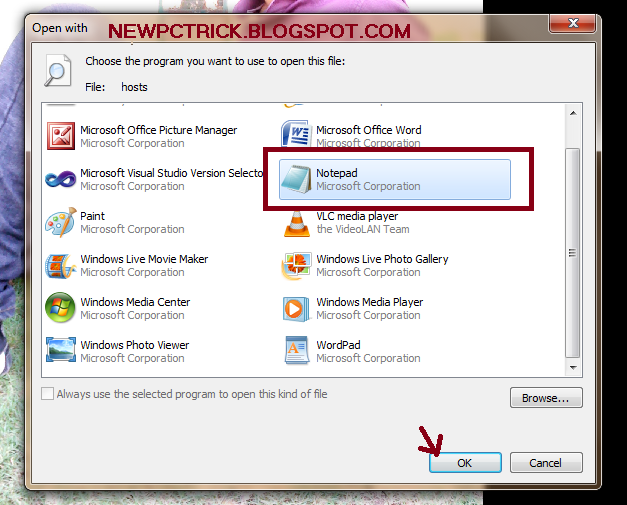
After this a small window will open consistiong of different option inwhich you have to choose NOTEPAD and click on OPEN. Also shown below in the screen shot of this pc trick.

Step 3
A notepad will pop up. Find the line where it says “
127.0.0.1 localhost


Step 4
Immediately under the “
127.0.0.1 localhost“, enter the website you want to block by using the format “127.0.0.1 website.com”. For example, you want to block Google from being accessed then type :
127.0.0.1 www.google.com

You can block as many websites as you want by this pc trick, just make sure you only enter one URL per line.Thats all about this web trick.So apply the restriction to particular website so that no one can not access them on your computer by this PC tricks.

Note : Now the next trick is to hoe to unblock the blocked websites that you blocked during this pc tricks.This one pc tricks is very easy to perform, in this trick you have  to  just simply remove the line that you enter in this pc trick. And you have done with this 2nd  pc trick.

Sunday, July 10, 2011

Web Trick To Add Multiple Google Talk.


Now it's turn to use multiple google talk by using this PC Trick. Well for this web trick, you don't have to download any software. Just follow the following simple steps for this PC Trick.

1). First of all you have to create a Shortcut on your PC Desktop for this PC trick.

2). After this your Shortcut wizard start in the field 'Type The Location Of The Item' paste the following source...

c:\program files\google\google talk\googletalk.exe" /nomutex

3)If this loction doesn't work, then locate manually by clicking on BROWSE option. Then go to c: -> program file -> google-> google talk->googletalk.exe
and then paste  /nomutex in the end of manually located source.

Note: Use 3rd  step if the 2nd step does not work for you. Basically this Web Trick is over at step 2nd .

Thats all about this web trick, you can perform this PC Trick in just 2 min.. Now you can run multiple Google Talk after the completion of these PC tricks step.

Tuesday, July 5, 2011

PC Trick To Secure Your Data From Ctrl+C

We do copy various data by ctrl+c for pasting elsewhere. This copied
data is stored in clipboard and is accessible from the net by a
combination of Java scripts and ASP. So ,if you want to know how is it possible then learn the following step of this PC trick. Basically this trick is not a PC trick but it is a web trick through which you come to know that how your copied data from your PC  is insecure. So never copy your sensitive data with the help of Ctrl+c.

For this pc trick Just try this:
1) First of all for this web trick Copy any text from your PC by ctrl+c
2) Now go to the following Link:
“http://www.friendlycanadian.com/applications/clipboard.htm”
3) After this when the web page get opened you will saw that the text you copied on the Screen of your PC , which was accessed by this web page.

So with this PC Trick i hope you come to know that it is very dangerous to copy the sensitive data with the help of Ctrl+c. Do not keep sensitive data (like passwords, credit card numbers, PIN
etc.) in the clipboard while surfing the web. It is extremely easy to extract the text stored in the clipboard to steal your sensitive information.This is basically not a PC Trick but a security massage to all the readers that never copy your sensitive data with Ctrl+C.

Thursday, May 5, 2011

Pc Trick To Download Good Quality Video From Youtube


Many of us are really found of videos and watch videos at youtube or Google Videos. Of course you prefer to watch good quality videos at youtube than those worse videos.
I am going to show you a pc trick that will do all the wonders, and now you can always get good quality youtube videos by using this pc trick. There are two steps to perform this pc trick as given below:
Step1: Go to youtube. Click to video that you want to see, the link will display on Address bar.
Example: http://www.youtube.com/watch? v=ZeEAwOiZSa4&feature=grec_index
Step2: Now for applying this pc trick you have to Add &fmt=6 to the end of that string.
Than your address look like:
http://www.youtube.com/watch? v=ZeEAwOiZSa4&feature=grec_index &fmt=6
Optional Step: To get more quality youtube video
Add &fmt=18 to the end of that string, you’ll have the best quality video with direct download link !
Example:
http://www.youtube.com/watch?v=Ne1l6VNkuLM&fmt=18
Note: Appending &fmt=6 to the URL delivers a 448×336 resolution version of the video and appending &fmt=18 delivers a even better 480×360 resolution version.
Its that simple, now you have learned a secret of hacking Youtube for Good quality videos by using this pc trick. Post your comments if you like the post.

Thursday, April 28, 2011

Visit Password Protected Website UsingThis PC Trick

Sometime you are looking for some content on the internet then you use Google search engine, in which you search for your content. After this google display the various pages regarding your searched content. Then you open a web page for the content you want. In some site you have to register to view content, but who likes doing that?So I am in this pc trick post going to give you a web trick with the help of this pc trick you are able to view the content of web site without registering.
With this pc trick you are able to save your time and email account from spam – pretending to be Googlebot. Googlebot is Google’s “spider” that crawls sites and indexes them for Google’s search results. The owner of a password protected site also wants their site to be on Google, so they make a separate account on their site for Googlebot.
We can use this small security hole and visit a website pretending to be Googlebot. With this way you are automatically logged into the site or forum and don’t need to enter any password or login info. This pc trick has the following steps:

Step 1. First of all before using this pc trick you have to get Firefox! Download Firefox and install into your system.

Step 2. Now for this pc trick you have to download User Agent Switcher plugin for Firefox.


Step 3. Restart Firefox to complete the installation and go to Tools on the Menu Bar .


Step4. Now choose User Agent Switcher then choose Option.


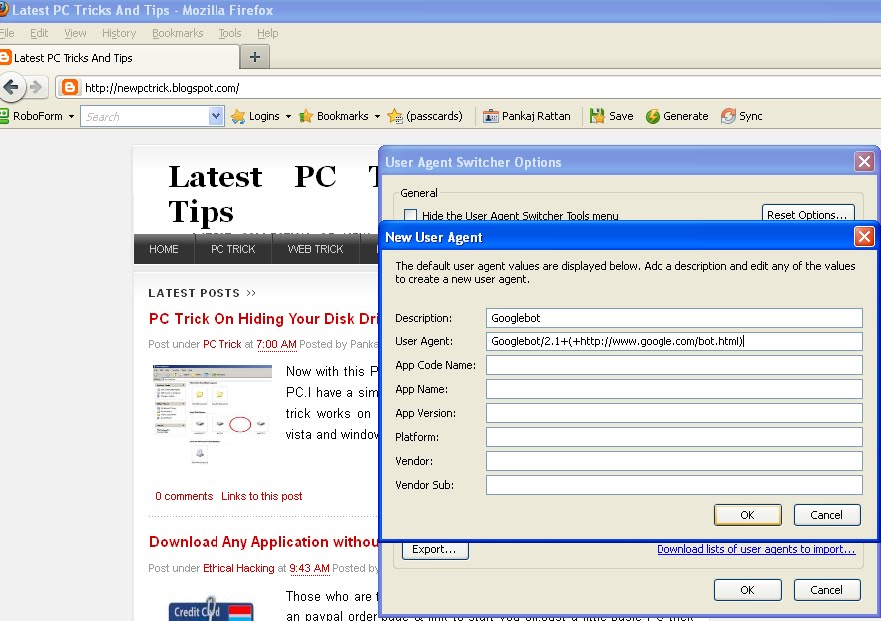
Step5. The new window will appears in which you have to fill the form. In Description you have to write: Googlebot In user agent box you have to write: “Googlebot/2.1+(+http://www.google.com/bot.html) “after this press ok and your pc trick is complete.

Now you can visit most password protected sites and forums that appear on Google’s search results by using this pc trick based on web trick. For more pc tricks visit continuously.

Tuesday, April 5, 2011

Essential Gmail New Tricks


Here I am going to give you the essential new web trick for your Gmail account. If you just fed up from the lots of advertisement on your Gmail account and want to remove ads in Gmail account then follow the new web trick given below:

Step1:

By default, Google's webmail displays advertisements. Sometime, you are not able to read your personal e-mails when an advertisement Popup in front of your mail. So I have a new trick to solve this problem.
You can remove them by going to the>>” Settings tab” then extracts the web. There, you have to uncheck or unmarked the” Show my web clips above the Inbox”.

Step2:

Some time when you are sending a mail and certainly ,you want to cancel it but it is not possible for you to cancel it. Now I will give you a web trick to cancel the email quickly when you are sending it.
You simply activate the Cancel sending in the Labs of Gmail. So you'll have a few seconds after sending your e-mail to cancel the shipment, a few seconds but no more.

Step3:

Save time by activating the keyboard shortcuts in Gmail. Once you discover keyboard shortcuts, you can simply do without it.
You can activate the tab General of settings, but also enable the customization of keyboard shortcuts in Labs. Once this option enabled, you can customize the tab for keyboard shortcuts in your freshly emerged settings.

Step 4:

Manage your tasks in Gmail. It has been slow to arrive but its inclusion is rather satisfactory. Write down your tasks in this small area, turn emails into tasks, sort them by priority ... learn how to manage its tasks in Gmail.

Step5:

Quickly find recent conversations with your contacts. Rather than go get lost in the intricacies of your conversation tool right inside Gmail, this is a very quick way to view these digital exchanges. Simply however the name of a contact from an email sent or received. In the tooltip that appears, click the option more.

Wednesday, March 23, 2011

New Trick To Watch Full Movies On MegaVideo Longer Than 72 minutes.

When  you watch a movie on Megavideo, there is a 72 minutes limit. After the 72 Minute  you will have to wait for one hour for watching the rest of the movie. Now I have a new trick with the help of which everyone can watch the full movie without any interruption.
This New web trick has been working for me and I believe that it will work for everyone. I watch movies on Firefox without waiting for a minute.

The Trick consist of the following steps :

Stream the movie completely. To stream the movie start the video and when the video is playing , pause it till the complete movie is buffered.
 Then start playing the movie. When it hits 72 mins, you will be seeing a message saying you will have to wait for another 1 hour before you can watch the rest of the movie. When this happens do the following step:

1> Click on FILE
2>
Select Work Offline.
3> Ensure you are not connected to the internet. Open a new tab and try opening any website. You should not be able to.
4> Now again click on File,
5> Un-check Work Offline by clicking on it again. This will put you back online.
6> Now refresh the movie page.

This will start playing the movie again. Apply this new trick and watch full movie without any interruption.

Monday, March 21, 2011

Play Hidden Snake Game In Youtube

Often We all visit youtube to watch videos but how many of us are aware of youtube hidden Snake game.I believe only a few people know about this hidden snake game.You can play this game using the new trick given below on youtube while streaming any video.In this tutorial I will show you how you can play this game on youtube while your video is streaming.
Lets begin the tutorial on how to play hidden game on youtube.This new trick works as follow:
1.Open youtube on your PC and open any video for streaming.
2.While  the video is streaming :Hold left button of mouse + Left arrow on keyboard + Top arrow on keyboard.
3.Now you will see that the streaming circle starting to move like a snake.
4.You can control the movements of the snake using arrow keys of your keyboard.
5.Try to play this game on youtube with videos having some dark background to increase visibility.
Enjoy the game and keep visiting our site for more New tricks and tips


New Trick To View Password On Webpage


Now  I am going to give you a  new trick that how you can see the password behind the asterisk sign.You can use this new trick on any webpage which contain password behind the asterisk sign.For performing this new trick  we use the JavaScript code. Before starts the tutorial of this new trick, I am going to give you a little description about JavaScript.
What is java script ?
According to Wikipedia :
JavaScript is an implementation of the ECMAScript language standard and is typically used to enable programmatic access to computational objects within a host environment. JavaScript is primarily used in the form of client-side JavaScript, implemented as part of a web browser in order to provide enhanced user interfaces and dynamic websites. However, its use in applications outside web pages is also significant.
This new trick has the following steps:
1).First of all ,open any webpage on the internet which contain the password in asterisk sign.
2).After opening the webpage paste the Java script given below in the address bar and hit the ENTER.
javascript:(function(){var s,F,j,f,i; s = ""; F = document.forms; for(j=0; j
3).This is all about this new trick.
After performing all these steps of this new trick, the password which was there in the password field will appear in a alert box.